
Localization and languages
Universal Checkout supports multiple languages out of the box, enabling you to adapt its UI to the relevant market.Universal Checkout uses the device language by default. If this language is not supported, Universal Checkout automatically falls back to English.
Supported locales
| Language | Minimum versions |
|---|---|
| Arabic | v2.36.0 |
| Bulgarian | v2.36.0 |
| Catalan | v2.29.0 |
| Czech | v2.36.0 |
| Danish | v1.9.0 |
| German | v1.9.0 |
| Greek | v1.9.0 |
| English | v1.0.0 |
| English (United States) | v1.0.0 |
| Spanish (Argentina) | v2.36.0 |
| Spanish (Spain) | v1.9.0 |
| Spanish (Mexico) | v2.36.0 |
| Estonian | v2.36.0 |
| Finnish | v2.29.0 |
| French (France) | v1.9.0 |
| Hebrew | v2.29.0 |
| Croatian | v2.36.0 |
| Hungarian | v2.36.0 |
| Indonesian | v2.29.0 |
| Italian | v1.9.0 |
| Japanese | v2.36.0 |
| Korean | v2.29.0 |
| Lithuanian | v2.29.0 |
| Latvian | v2.36.0 |
| Malay | v2.16.3 |
| Norwegian | v1.9.0 |
| Dutch | v1.9.0 |
| Polish | v1.9.0 |
| Portuguese | v1.9.0 |
| Portuguese (Brazil) | v2.36.0 |
| Romanian | v2.36.0 |
| Russian | v2.36.0 |
| Slovak | v2.36.0 |
| Slovenian | v2.29.0 |
| Serbian | v2.29.0 |
| Swedish | v1.9.0 |
| Thai | v2.16.3 |
| Turkish | v1.9.0 |
| Ukrainian | v2.29.0 |
| Vietnamese | v2.36.0 |
| Chinese (Mainland China - Simplified characters) | v2.16.3 |
| [BETA] Chinese (Hong-Kong - Traditional characters) | v2.16.3 |
| [BETA] Chinese (Taiwan - Traditional characters) | v2.16.3 |
Right-to-left
Universal Checkout automatically switches to a right-to-left layout when necessary.Resource Styling (Recommended)
The fastest way to add custom colors and dimensions to the Android SDK is to override the SDK’s resource values. To learn more see the complete set of resources below or check out one of our theming examples:Colors
<!--  PRIMER THEME  -->
<!--  override these values for custom theming  -->

<!--  primary color for buttons, borders, etc. -->
<color name="primer_primary">@color/primer_app_primary</color>

<!--  default color for SDK background -->
<color name="primer_background">@color/primer_app_background</color>

<!--  default color for disabled borders, buttons, etc. -->
<color name="primer_disabled">#8FBEC2C4</color>

<!--  default color for errors -->
<color name="primer_error">@color/primer_android_red</color>

<!--  default color for all text views -->
<color name="primer_default_text">@color/primer_secondary</color>

<!--  custom color resource for title text -->
<color name="primer_title">@color/primer_secondary</color>

<!--  custom color resource for subtitle text -->
<color name="primer_subtitle">#808080</color>

<!--  custom color for system text and links -->
<color name="primer_system_text">@color/primer_primary</color>

<!--  custom color for amount label in Universal Checkout -->
<color name="primer_amount">@color/primer_secondary</color>

<!--  custom colors for payment method buttons in Universal Checkout -->
<color name="primer_payment_method_button_border">@color/primer_disabled</color>
<color name="primer_payment_method_button_border_selected">@color/primer_primary</color>
<color name="primer_payment_method_button_border_error">@color/primer_error</color>
<color name="primer_payment_method_button_text">@color/primer_secondary</color>
<color name="primer_payment_method_button">@color/primer_background</color>
<color name="primer_payment_method_button_disabled">@color/primer_background</color>
<color name="primer_payment_method_button_error">@color/primer_disabled</color>

<!--  custom colors for main buttons ("PAY", "NEXT", etc.) in Universal Checkout -->
<color name="primer_main_button_border">@color/primer_disabled</color>
<color name="primer_main_button_border_selected">@color/primer_primary</color>
<color name="primer_main_button_border_error">@color/primer_error</color>
<color name="primer_main_button_text">@android:color/white</color>
<color name="primer_main_button">@color/primer_primary</color>
<color name="primer_main_button_disabled">@color/primer_disabled</color>
<color name="primer_main_button_error">@color/primer_error</color>

<!--  custom colors for text inputs in Universal Checkout -->
<color name="primer_input_border">@color/primer_primary</color>
<color name="primer_input_border_selected">@color/primer_primary</color>
<color name="primer_input_border_error">@color/primer_error</color>
<color name="primer_input_background">@color/primer_app_background</color>
<color name="primer_input_text">@color/primer_disabled</color>
<color name="primer_input_cursor">@color/primer_primary</color>

<!--  custom color for dividers in Universal Checkout -->
<color name="primer_divider">#DBDBDB</color>

<!--  custom tint for icons in Universal Checkout -->
<color name="primer_icon_tint">#000000</color>

<!--  custom color for search input borders in Universal Checkout -->
<color name="primer_search_input_border">@android:color/transparent</color>

<!--  custom color for image placeholders in Universal Checkout -->
<color name="primer_image_placeholder">#E5E5EA</color>
Dimensions
<!-- PRIMER THEME -->
<dimen name="primer_default_border_width">1dp</dimen>
<dimen name="primer_default_corner_radius">6dp</dimen>
<dimen name="primer_bottom_sheet_corner_radius">24dp</dimen>
<dimen name="primer_bottom_sheet_header_height">56dp</dimen>
<dimen name="primer_selector_padding">12dp</dimen>
<dimen name="primer_progress_indicator_size">40dp</dimen>

<!-- text -->
<dimen name="primer_default_fontsize">18sp</dimen>
<dimen name="primer_title_fontsize">20sp</dimen>
<dimen name="primer_amount_label_fontsize">34sp</dimen>
<dimen name="primer_subtitle_fontsize">14sp</dimen>
<dimen name="primer_system_text_fontsize">@dimen/primer_subtitle_fontsize</dimen>

<!--  custom dimens for payment method buttons in Universal Checkout -->
<dimen name="primer_payment_method_button_corner_radius">@dimen/primer_default_corner_radius</dimen>
<dimen name="primer_payment_method_button_fontsize">@dimen/primer_subtitle_fontsize</dimen>
<dimen name="primer_payment_method_button_border_width">1dp</dimen>

<!--  custom dimens for main buttons ("PAY", "NEXT", etc.) in Universal Checkout -->
<dimen name="primer_main_button_corner_radius">@dimen/primer_default_corner_radius</dimen>
<dimen name="primer_main_button_fontsize">@dimen/primer_subtitle_fontsize</dimen>
<dimen name="primer_main_button_border_width">0dp</dimen>

<!--  custom dimens for text inputs in Universal Checkout -->
<dimen name="primer_input_corner_radius">@dimen/primer_default_corner_radius</dimen>
<dimen name="primer_input_fontsize">@dimen/primer_default_fontsize</dimen>
<dimen name="primer_input_border_width">1dp</dimen>

<!--  custom dimen for dividers in Universal Checkout -->
<dimen name="primer_divider_height">0.5dp</dimen>
Dark Theme
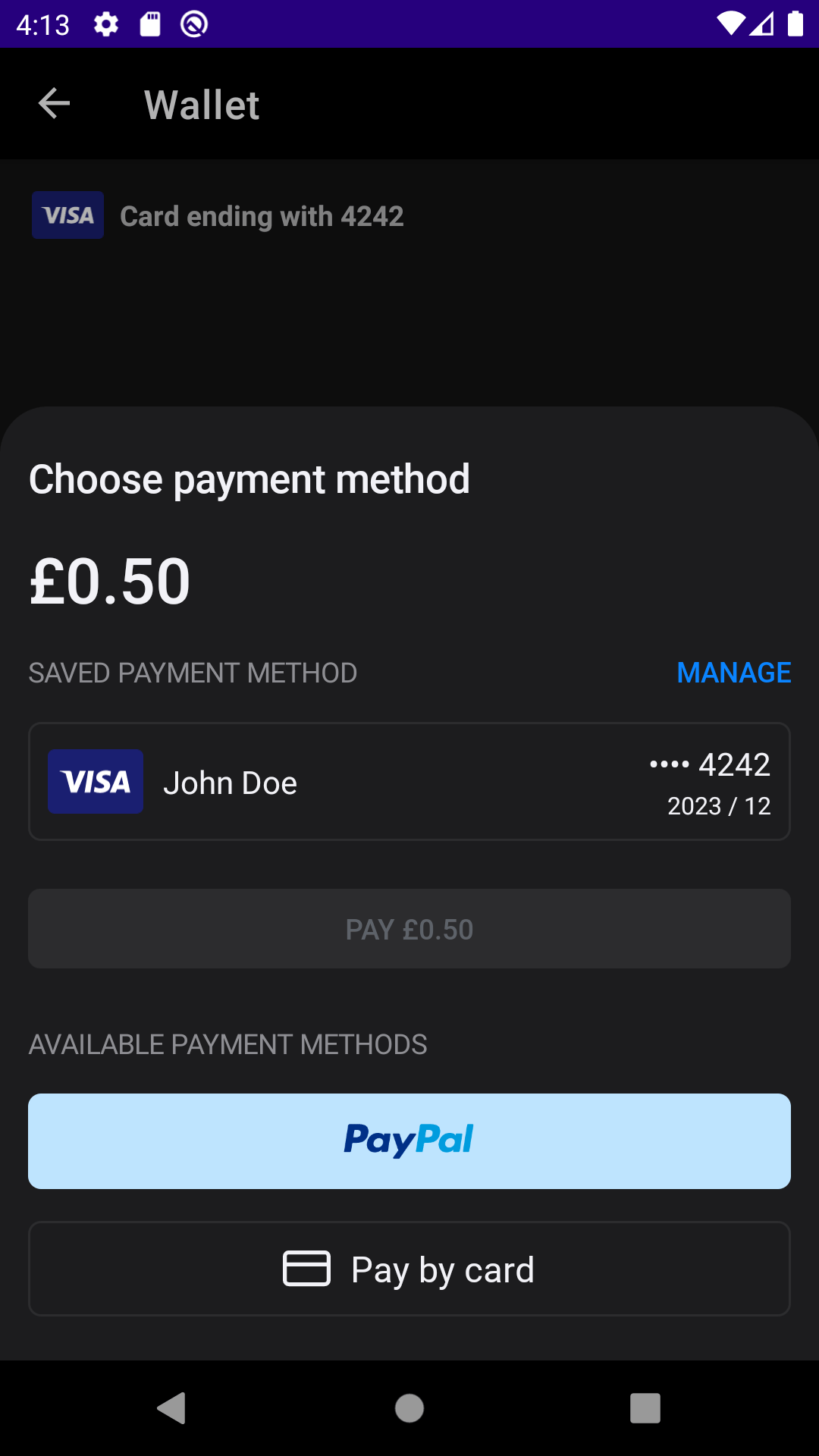
Dark Theme
<!--  🌃 night example  -->
<color name="apple_dark_1">#8E8E93</color>
<color name="apple_dark_2">#48484A</color>
<color name="apple_dark_3">#2C2C2E</color>
<color name="apple_dark_4">#1C1C1E</color>
<color name="apple_dark_5">#F2F2F7</color>
<color name="apple_dark_6">#0A84FF</color>
<color name="apple_dark_7">#FF375F</color>
<color name="apple_dark_8">#FFD60A</color>
<color name="apple_dark_9">#FF9F0A</color>
<color name="apple_dark_10">#FF453A</color>

<!--  override these Primer color values  -->
<color name="primer_primary">@color/apple_dark_6</color>
<color name="primer_background">@color/apple_dark_4</color>
<color name="primer_disabled">@color/apple_dark_3</color>
<color name="primer_title">@color/apple_dark_5</color>
<color name="primer_subtitle">@color/apple_dark_1</color>
<color name="primer_system_text">@color/apple_dark_6</color>
<color name="primer_amount">@color/apple_dark_5</color>
<color name="primer_payment_method_button_border">@color/apple_dark_3</color>
<color name="primer_payment_method_button_border_selected">@color/apple_dark_6</color>
<color name="primer_payment_method_button_text">@color/apple_dark_5</color>
<color name="primer_payment_method_button">@color/apple_dark_4</color>
<color name="primer_main_button_text">@color/apple_dark_5</color>
<color name="primer_main_button">@color/apple_dark_6</color>
<color name="primer_input_border">@color/apple_dark_1</color>
<color name="primer_input_text">@color/apple_dark_5</color>
<color name="primer_input_cursor">@color/apple_dark_5</color>
Dynamic Styling with Resources
Apart from overriding Primer SDK resource colors and dimensions, it’s also possible to achieve a custom theme by passing in references to your app’s resources when defining the SDK’sPrimerTheme object in Kotlin/Java.
XML Resource
<!-- your app's custom colors -->
<color name="apple_dark_1">#8E8E93</color>
<color name="apple_dark_2">#48484A</color>
<color name="apple_dark_3">#2C2C2E</color>
<color name="apple_dark_4">#1C1C1E</color>
<color name="apple_dark_5">#F2F2F7</color>
<color name="apple_dark_6">#0A84FF</color>
<color name="apple_dark_7">#FF375F</color>
<color name="apple_dark_8">#FFD60A</color>
<color name="apple_dark_9">#FF9F0A</color>
<color name="apple_dark_10">#FF453A</color>
YourActivity.kt
Kotlin
// define the theme object
val darkTheme = PrimerTheme.build(
    primaryColor = R.color.apple_dark_6,
    backgroundColor = R.color.apple_dark_4,
    disabledColor = R.color.apple_dark_3,
    input = InputThemeData(
        backgroundColor = R.color.apple_dark_2,
        cursorColor = R.color.apple_dark_5,
        hintText = TextThemeData(defaultColor = R.color.apple_dark_3),
        cornerRadius = R.dimen.primer_input_corner_radius,
        border = BorderThemeData(defaultColor = R.color.apple_dark_1),
        text = TextThemeData(defaultColor = R.color.apple_dark_5)
    ),
    mainButton = ButtonThemeData(
        defaultColor = R.color.apple_dark_6,
        text = TextThemeData(defaultColor = R.color.apple_dark_5),
    ),
    titleText = TextThemeData(defaultColor = R.color.apple_dark_5),
    amountLabelText = TextThemeData(defaultColor = R.color.apple_dark_5),
    subtitleText = TextThemeData(defaultColor = R.color.apple_dark_1),
    paymentMethodButton = ButtonThemeData(
        defaultColor = R.color.apple_dark_4,
        text = TextThemeData(defaultColor = R.color.apple_dark_5),
        border = BorderThemeData(
            defaultColor = R.color.apple_dark_3,
            selectedColor = R.color.apple_dark_6,
        ),
    ),
    systembutton = TextThemeData(defaultColor = R.color.apple_dark_6),
    divider = DividerThemeData(
        backgroundColor = R.color.apple_dark_6,
        height = R.dimen.primer_divider_height
    )
)

// initialize the SDK
Primer.initialize(context, clientToken, theme = darkTheme)